Animated policy gear turning continuously, with a small badge cycling from a locked padlock to an unlocked padlock to a green checkmark

Active Directory Group Policy Manager

See what every GPO actually does, where it applies, and fix it - safely. Group Policy Manager reads real SYSVOL content and real link topology that nothing else in our AD suite touches, then lets you create, link, and edit GPOs through a staged review-before-apply workflow - the first write-capable tool we've built for Active Directory.

Every other AD tool in our suite reports on Group Policy only at the edges - metadata, or who can edit a GPO's permissions. Nothing reads what a GPO actually configures, or how link order, enforcement, and blocked inheritance really resolve. Group Policy Manager reads the real SYSVOL settings files (security policy, user rights assignments, restricted groups, and a curated set of Administrative Template policies) and the real gPLink/gPOptions link topology - correct link precedence included, which is easy to get backwards. And because seeing a problem is only half the job, it can fix it too: create or delete a GPO, link or unlink it, reorder/enforce/block-inherit a link, or edit a setting - every change queued for your review before anything ever touches Active Directory or SYSVOL. Nothing writes itself; you always see the full diff and click Apply.

Screenshot

See it in action

The real app. Click to zoom in, hover the markers to see what each part does.

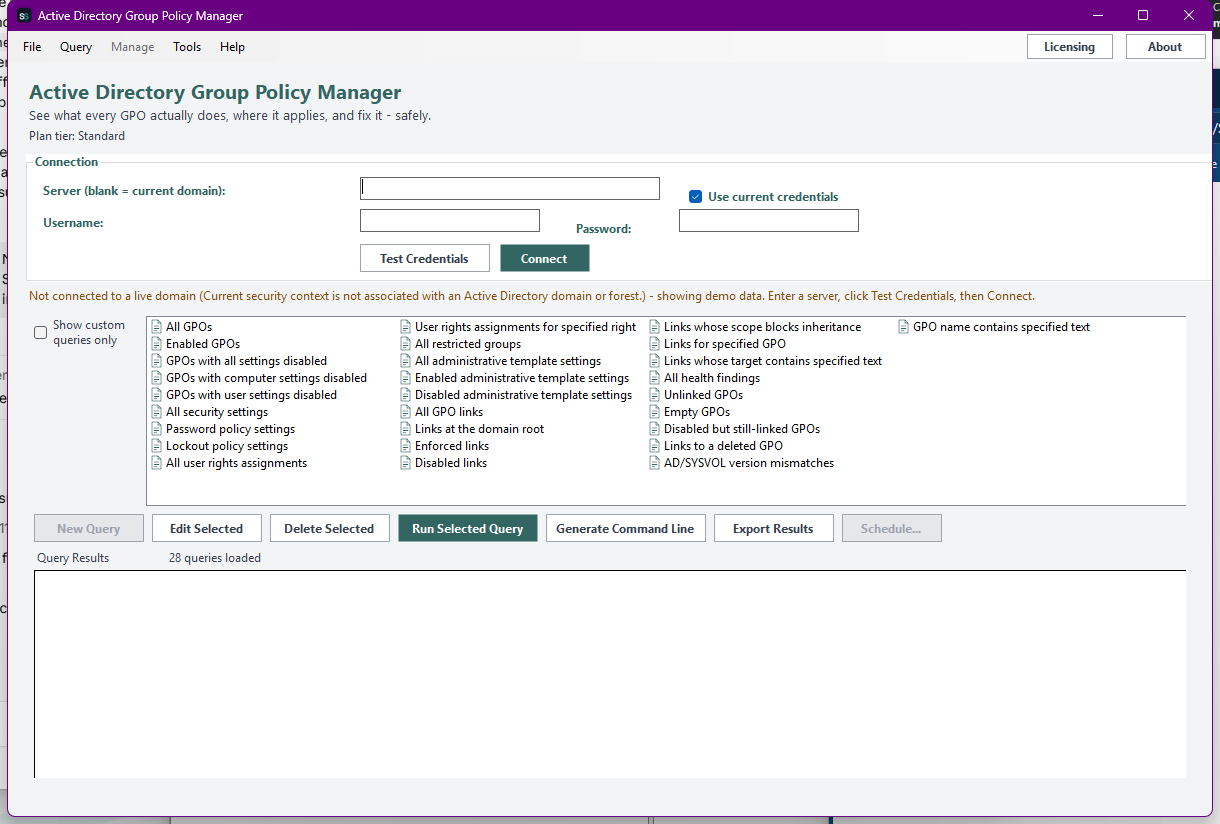
Active Directory Group Policy Manager showing the Connection panel, the unified 28-query catalog spanning GPO inventory, settings, links, and health findings, and the Manage menu that holds every write action
Click to zoom

Hover a marker for details, or click the screenshot to zoom in.

Active Directory Group Policy Manager, zoomed in
Features

Read everything, change it safely

Real SYSVOL settings, not just metadata

Reads GptTmpl.inf (password/lockout policy, user rights assignments, restricted groups) and both halves of Registry.pol against a curated set of well-known Administrative Template policies - what a GPO actually configures, not just its name and version numbers.

Real link topology and precedence

Parses gPLink/gPOptions directly - link order, enforced, blocked inheritance - the one thing nothing else in our AD suite reads. Health findings catch unlinked, empty, disabled-but-linked, and orphaned-link GPOs, plus AD/SYSVOL version drift.

Staged review, always

Every write action - create, delete, link, unlink, reorder, or edit a setting - only ever queues a change. Nothing reaches Active Directory or SYSVOL until you review the full plain-language diff and click Apply, with a local audit trail of every attempt.

Create, link, and edit GPOs

Create or delete a GPO, link or unlink it to an OU or the domain root, reorder/enforce/block-inherit a link, and edit security settings, user rights, restricted groups, or Administrative Template policies - all from one app.

Custom queries & a headless CLI

Build your own filters against any GPO, setting, or link attribute. The headless CLI stays deliberately read-only, even at Professional - ActiveDirectoryGroupPolicyManager.exe --run-report ... and --run-query ... only ever report, never write unattended.

Scheduled & emailed reports

Save any query as a recurring report via Windows Task Scheduler, with the result optionally emailed to you the moment a health finding like an orphaned link or version mismatch appears.

Plans & Pricing

Each tier unlocks more

Pick how much automation you need, then choose once-off or monthly billing. Group Policy Manager licenses per machine, not by domain size.

One-time payment - yours to keep, no subscription.

Standard

For the quick inventory.

GPO inventory on screen - names, status, AD/SYSVOL version numbers - free at every tier.

Standard+

For seeing what GPOs do.

Everything in Standard, plus real SYSVOL settings and link-topology reporting, and CSV/Text export.

Advanced

For ongoing hygiene.

Everything in Standard+, plus health findings (unlinked/empty/orphaned/version-mismatch), custom queries, and richer export formats.

All plans are billed in USD. Prices in other currencies are an approximate conversion for your reference, based on indicative exchange rates - your invoice will be issued in USD.

Standard

Standard covers the free floor: GPO inventory - name, status, AD/SYSVOL version numbers - on screen. No settings/link reporting, health findings, write management, or export at this tier, by design.

Best for: A fast first answer to "how many GPOs do we actually have?"

Standard+

Standard+ adds the real payoff of reading SYSVOL and gPLink directly: security settings, user rights, restricted groups, Administrative Template settings, and link rows with real order/enforced/block-inheritance - plus CSV/Text report export. Everything from Standard is included.

Best for: Finally seeing what a GPO actually does, not just its name.

Advanced

Advanced adds health findings - unlinked, empty, disabled-but-linked, orphaned links, and AD/SYSVOL version mismatches - plus custom queries and richer export formats. Everything from Standard+ is included.

Best for: Ongoing Group Policy hygiene reviews, catching drift before it causes a support ticket.

Prices shown are a suggested starting point, not final quotes - contact us to confirm your plan.

Interested in Active Directory Group Policy Manager?

Contact us for current pricing and licensing options.

Contact us