Animated directory tree - a domain node branching to sites and domain controllers, each lighting up in sequence with an info badge as it's queried

Active Directory Info

Everything you need to know about your domain, in one window - FSMO role holders, Domain Controllers, Sites & Subnets, Trusts, OU tree, password policy, schema, and replication health, plus a full object-reporting browser across Users, Groups, Computers, Contacts, Printers, and Group Policy Objects.

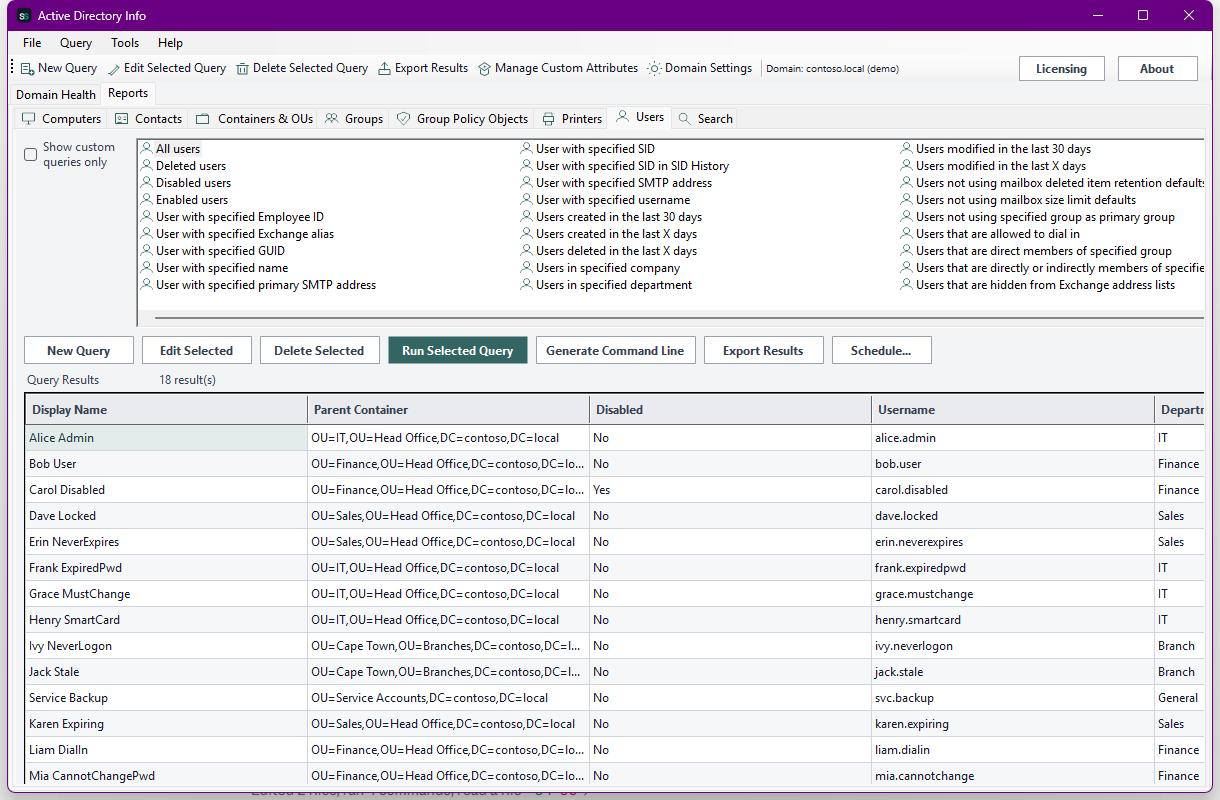
Active Directory Info is two tools in one. Domain Health gives you the topology view - domain and forest identity, the five FSMO role holders, every Domain Controller, Sites & Subnets, Trusts, the OU tree, default Password/Lockout policy, Schema version, and replication status between domain controllers. Reports is a full object-reporting browser in the same spirit as the tools AD admins already know - around 180 built-in queries across Computers, Contacts, Containers & OUs, Groups, Group Policy Objects, Printers, and Users, each one letting you scope the search to the whole domain or a single OU and pick exactly which attributes come back. Build your own queries with custom filter conditions and named attributes, export to CSV, Excel, HTML, XML, or the clipboard, and schedule any of it to run - and email itself to you - unattended.

Screenshot

See it in action

The real app. Click to zoom in, hover the markers to see what each part does.

Active Directory Info showing the Reports tab, Users category with a small icon next to every built-in query, the 'All users' query selected, and its results grid populated with 18 users
Click to zoom

Hover a marker for details, or click the screenshot to zoom in.

Active Directory Info, zoomed in
Features

Everything about your domain, one click away

Domain health at a glance

Domain/forest identity, the five FSMO role holders, every Domain Controller with its site/OS/GC status, Sites & Subnets, and Trust relationships - the panel every AD Info tool leads with.

~180 built-in queries

Users, Groups, Computers, Contacts, Containers & OUs, Group Policy Objects, and Printers each get a full catalog of ready-made queries - enabled/disabled/locked-out accounts, stale computers, empty groups, nested membership, deleted and protected objects, and far more.

Scope and column control

Every query run lets you search the entire domain or limit it to one OU (with or without sub-containers), and pick exactly which attributes come back - the same "Select Output Attributes and Container" step whether it's a built-in query or your own.

Custom queries & attributes

Build your own query from filter conditions on any attribute, register LDAP attributes under a friendly display name via Manage Custom Attributes, and reuse them alongside the built-in catalog - filterable to "custom queries only".

Export anywhere

CSV, Excel (a real .xlsx, no Office install required), HTML, XML, plain text, or straight to the clipboard - one shared export path for every query, built-in or custom.

Scheduled & emailed reports

Save any query as a recurring report via Windows Task Scheduler, with the result optionally emailed to you afterward - or drive it yourself from scripts with ActiveDirectoryInfo.exe --run-report ... and --run-query ....

Plans & Pricing

Each tier unlocks more

Pick how much automation you need, then choose once-off or monthly billing. Active Directory Info licenses per machine, not by domain size.

One-time payment - yours to keep, no subscription.

Standard

For a quick domain health check.

Domain/forest overview, FSMO role holders, and the Domain Controllers list, on screen.

Standard+

For day-to-day AD reporting.

Everything in Standard, plus Sites & Trusts, report export, and full Users/Groups/Computers reporting.

Advanced

For the complete picture.

Everything in Standard+, plus the OU tree, policy/schema, Contacts/Printers/GPO reporting, custom queries, and richer export formats.

All plans are billed in USD. Prices in other currencies are an approximate conversion for your reference, based on indicative exchange rates - your invoice will be issued in USD.

Standard

Standard covers the core of any AD Info tool: domain and forest identity, the five FSMO role holders, and the full Domain Controllers list with site, OS, and Global Catalog status - all on screen. No Sites/Trusts, object reporting, or export at this tier, by design.

Best for: Anyone who just needs a fast answer to "what does this domain look like?"

Standard+

Standard+ adds Sites & Subnets, Trust relationships, domain-health report export (CSV/text), and the three most-used report categories - Users, Groups, and Computers - each with their full built-in query catalog, scoped search, and column selection. Everything from Standard is included.

Best for: Day-to-day AD administration and reporting.

Advanced

Advanced adds the OU tree, default Password/Lockout policy, Schema version, the remaining report categories (Contacts, Containers & OUs, Printers, Group Policy Objects), custom queries with Manage Custom Attributes, and Excel/HTML/XML/clipboard export. Everything from Standard+ is included.

Best for: Teams that need the complete directory picture, not just the headline objects.

Prices shown are a suggested starting point, not final quotes - contact us to confirm your plan.

Interested in Active Directory Info?

Contact us for current pricing and licensing options.

Contact us