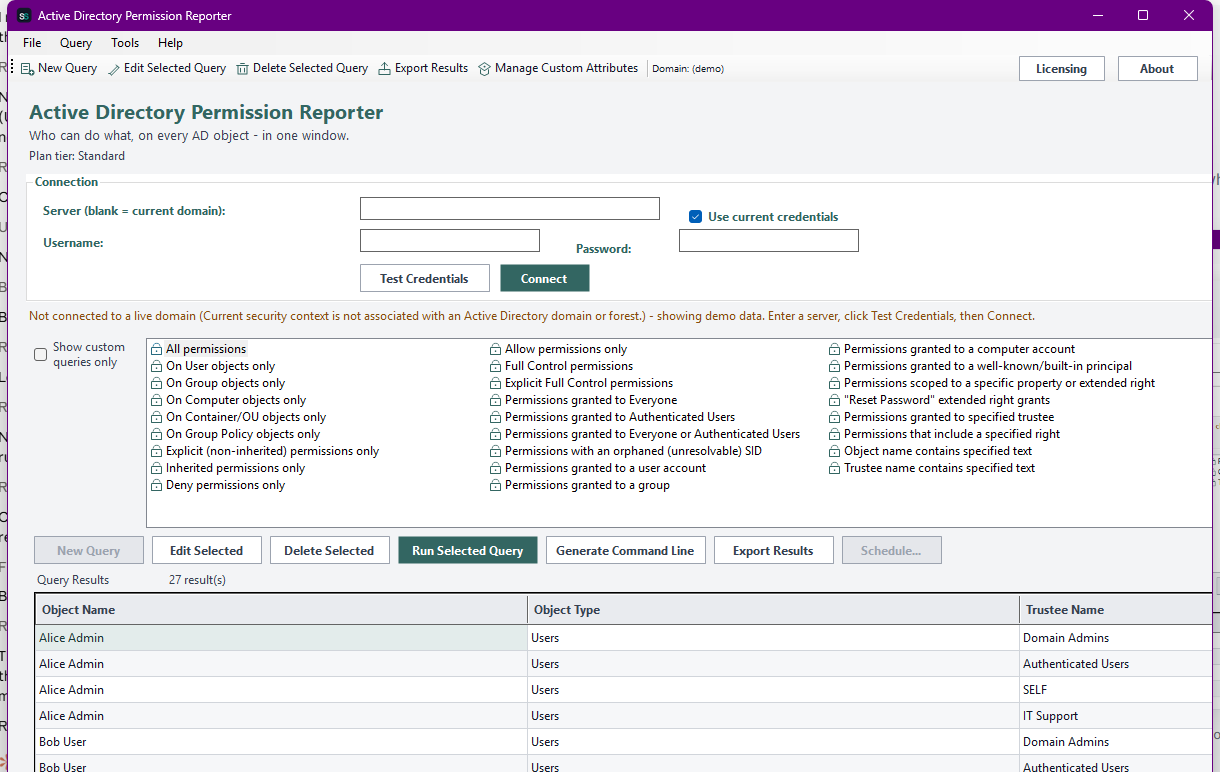
See exactly who has what rights on every Active Directory object - Users, Groups, Computers, Containers & OUs, and Group Policy Objects - one row per access control entry, with the trustee, Allow or Deny, the rights granted, and whether it's inherited or explicit.
Active Directory Permission Reporter reads the actual security descriptor (nTSecurityDescriptor) on every object it scans and turns each access control entry into one report row - who the trustee is, whether the entry is Allow or Deny, which rights it grants, whether it's inherited from a parent container or explicit on the object itself, and (where relevant) which specific property or extended right it's scoped to, like "Reset Password". Every object type - Users, Groups, Computers, Containers & OUs, and Group Policy Objects - shows up in one unified list with 26 built-in queries, since the underlying ACE model is identical no matter which object class it's attached to: explicit vs inherited, Allow vs Deny, grants to Everyone or Authenticated Users, orphaned/unresolvable SIDs, "On ... objects only" filters, and parameterized searches for a specified trustee or right. Build your own queries with custom filter conditions, export to CSV, Excel, HTML, XML, or the clipboard, and schedule any of it to run - and email itself to you - unattended.

The real app. Click to zoom in, hover the markers to see what each part does.
Hover a marker for details, or click the screenshot to zoom in.
Every ACE on an object's security descriptor becomes a report row: trustee, Allow/Deny, rights granted, inherited or explicit, and what it applies to - not just a summary, the actual ACL.
Explicit vs inherited permissions, Allow vs Deny, Full Control grants, grants to Everyone or Authenticated Users, orphaned/unresolvable SIDs, trustee account type, property/extended-right-scoped entries like "Reset Password", and "On ... objects only" filters - no separate tab per object type needed, since the ACE model is shared.
Every query run lets you search the entire domain or limit it to one OU (with or without sub-containers), and pick exactly which attributes come back - the same "Select Output Attributes and Container" step whether it's a built-in query or your own.
Build your own query from filter conditions on any attribute, register extra attributes under a friendly display name via Manage Custom Attributes, and reuse them alongside the built-in catalog - filterable to "custom queries only".
CSV, Excel (a real .xlsx, no Office install required), HTML, XML, plain text, or straight to the clipboard - one shared export path for every query, built-in or custom.
Save any query as a recurring report via Windows Task Scheduler, with the result optionally emailed to you afterward - or drive it yourself from scripts with ActiveDirectoryPermissionReporter.exe --run-report ... and --run-query ....
Pick how much automation you need, then choose once-off or monthly billing. Active Directory Permission Reporter licenses per machine, not by domain size.
One-time payment - yours to keep, no subscription.
For core permission audits.
Full permission reporting on Users, Groups, and Computers, on screen, free at every tier.
For the complete object picture.
Everything in Standard, plus Containers & OUs / Group Policy Objects reporting and CSV/Text export.
For deeper investigation.
Everything in Standard+, plus custom queries, richer export formats, and the effective-permissions search for a specified trustee.
For fully unattended audits.
Everything in Advanced, plus scheduled & emailed reports and a headless CLI.
All plans are billed in USD. Prices in other currencies are an approximate conversion for your reference, based on indicative exchange rates - your invoice will be issued in USD.
Standard covers the core of any permission audit: full ACE-level reporting on Users, Groups, and Computers, with the complete built-in query catalog, scoped search, and column selection - all on screen. No Containers & OUs/GPO reporting or export at this tier, by design.
Best for: Anyone who needs a fast answer to "who has access to this account or group?"
Standard+ adds the two remaining report categories - Containers & OUs and Group Policy Objects - plus CSV/Text report export. Everything from Standard is included.
Best for: Day-to-day delegation reviews across the whole directory, not just accounts.
Advanced adds custom queries with Manage Custom Attributes, Excel/HTML/XML/clipboard export, and the cross-category effective-permissions search for a specified trustee. Everything from Standard+ is included.
Best for: Security teams building their own delegation or excessive-access reports.
Professional adds scheduled reports via Windows Task Scheduler with optional email delivery, and a headless CLI (ActiveDirectoryPermissionReporter.exe --run-report, --run-query, --run-custom-query). Everything from Advanced is included.
Best for: Organizations that want recurring permission audits running themselves, not rebuilt by hand every time.
Prices shown are a suggested starting point, not final quotes - contact us to confirm your plan.
Contact us for current pricing and licensing options.
Contact us